
Credit Card Control Excel Template




Roll over image to zoom in
$ 19
This spreadsheet helps manage credit card expenses by automating monthly allocations, tracking purchases, and analyzing spending.
Credit Card Control Excel Template is designed to help you manage your credit card expenses effectively. By entering purchases made with your credit card, the spreadsheet automatically distributes the amounts across months according to the number of installments.
The spreadsheet consists of five sheets:
Sheets in Credit Card Control Excel Template
- Settings
Fill in your credit card details.
Necessary: Only fill blank cells. The remaining cells contain formulas. - Expense Categories Registration
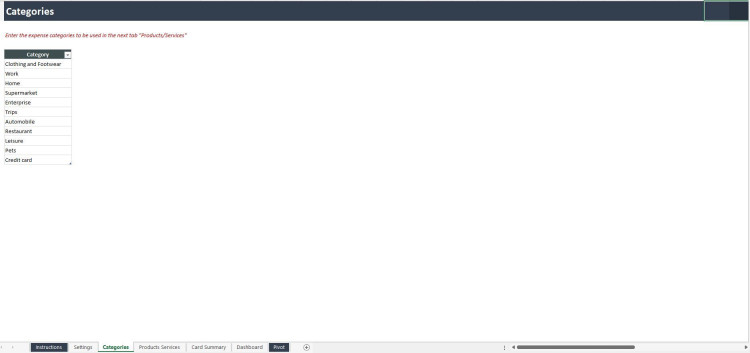
Define and register categories of expenses that will be used in the “Products/Services” sheet. - Products/Services Registration
Enter the products or services you’ve purchased and link each one to its corresponding expense category defined in the previous sheet. - Credit Card Purchase Entry
Record your credit card purchases by selecting a product or service, entering the number of installments, the purchase date, and the total amount.
Important: Only input data into blank cells; all other cells contain pre-existing formulas to ensure accuracy. - Dashboard
View your credit card data and analyze key expense indicators through intuitive cards and charts. Filter results by category and payment conditions using the dropdown boxes provided.
This tool simplifies expense tracking, automatically calculates monthly allocations, and offers a clear, organized overview of your spending to maintain financial control, helping you plan and manage your budget more effectively and accurately.
General Inquiries
There are no inquiries yet.




Reviews
There are no reviews yet.