
DevOps KPI Dashboard Excel Template | Track Analyze DevOps Metrics | Monthly & Cumulative Performance | Dynamic Charts | Easy to Use



$ 35
Elevate your DevOps performance tracking with the DevOps KPI Dashboard Excel Template.
For more details about the template, check the link below;
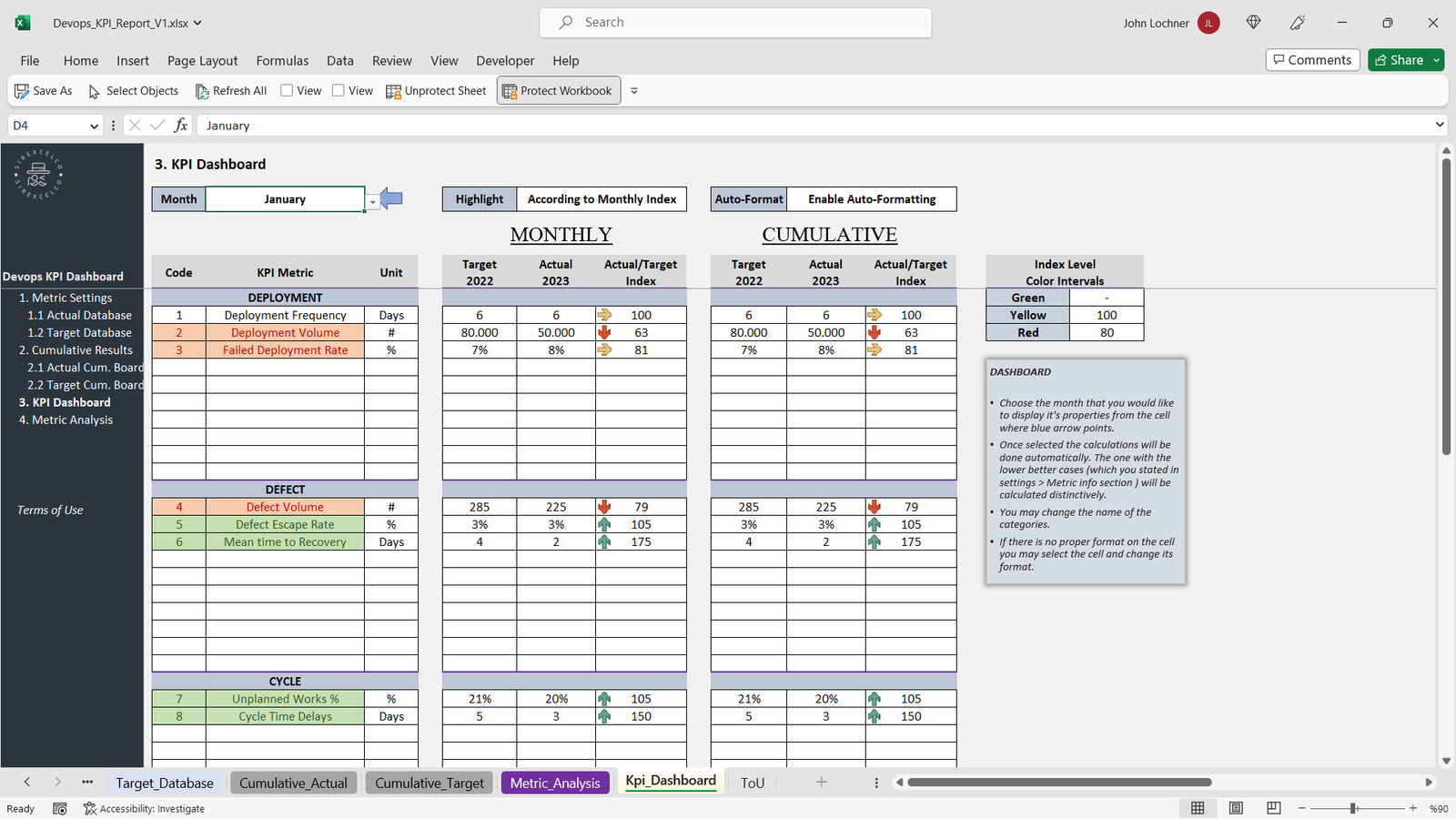
This user-friendly template allows you to measure and compare key DevOps metrics month by month, with cumulative analysis and dynamic charts that respond to selected metrics. Easily compare actual performance with target metrics to optimize your DevOps processes and workflow. Perfect for professionals looking to improve efficiency and track critical KPIs in their DevOps environment. Whether you’re focused on deployment, automation, or incident response, this template simplifies your data analysis, making it a must-have tool for any DevOps team.
Best for:
• DevOps
• Developers
• System Admins
Content:
• Excel file compatible with Excel 2010 and higher (and with sample data)
• Professional Design
• Works both on Mac and Windows
• No installation needed. Ready to use
• Dashboard with charts
• DevOps Kpi Dashboard Template
• Easy to use
• 100% editable
• Excel file
• Instant download
• Friendly customer support for all your questions
DevOps KPI Dashboard Excel Template
Elevate your DevOps team’s performance and streamline workflow monitoring with the DevOps KPI Dashboard Excel Template. Designed for professionals, system administrators, and developers, this template provides a comprehensive and interactive way to track, measure, and optimize key DevOps metrics in one central tool.
Key Features:
-
Track Critical DevOps Metrics – Monitor essential metrics such as deployment frequency, mean time to recovery (MTTR), incident resolution time, automation coverage, and system uptime.
-
Monthly & Cumulative Analysis – Assess performance over time with dynamic charts and tables that update automatically when you enter your data.
-
Target vs Actual Comparison – Easily compare actual performance against predefined targets to identify areas of improvement and optimize processes.
-
Dynamic & Interactive Charts – Visualize your DevOps performance with responsive charts that adjust based on the selected metrics, providing actionable insights at a glance.
-
Customizable & User-Friendly – No advanced Excel skills required. Fully editable fields allow you to tailor the dashboard to your team’s unique KPIs.
-
Cross-Platform Compatibility – Works seamlessly on Microsoft Excel 2010 and higher, on both Windows and Mac.
-
Instant Access – No installation needed. Download instantly and start tracking immediately.
Why Choose This Template:
The DevOps KPI Dashboard Excel Template is designed to save time, reduce manual reporting errors, and provide clear visibility into your DevOps operations. By consolidating your key metrics into a single, dynamic dashboard, you can quickly identify bottlenecks, enhance automation efficiency, and make informed decisions to drive continuous improvement.
Whether you are managing CI/CD pipelines, tracking system performance, or analyzing incident resolution times, this template simplifies complex data into actionable insights. It’s an indispensable tool for teams striving to improve deployment speed, operational efficiency, and overall system reliability.
Best For:
-
DevOps Teams
-
System Administrators
-
Software Developers
-
IT Operations Managers
-
Continuous Improvement Specialists
Product Content:
-
Excel file compatible with Excel 2010 and higher (with sample data)
-
Professional and intuitive dashboard design
-
Fully editable and customizable to your workflow
-
Ready-to-use charts and tables for instant insights
-
Instant download with friendly customer support
License:
-
Private Use only (not for distribution or resale)
General Inquiries
There are no inquiries yet.


Reviews
There are no reviews yet.